


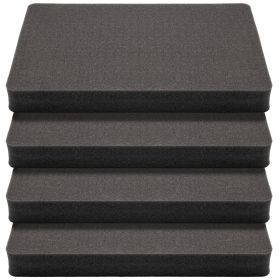

Pelican Pluck Foam, Reusable Inserts & Replacement Foam for Pelican Cases
Looking for Pelican pluck foam? There are three ways to refill a Pelican case, and we stock all of them: pre-scored pick and pluck foam in Pelican footprints, RAGAR reusable inserts cut to Pelican interior dimensions, and CNC-cut custom foam for a fixed kit. Factory Pelican foam is consumable by design — once the cubes are torn out, that layout is permanent. The foam on this page is how you replace it, or how you skip the tearing altogether.
Pelican Pluck Foam vs RAGAR Reusable Foam vs Custom-Cut
| Foam type | How it works | Best for | Reusable? |
|---|---|---|---|
| Pick and pluck foam | Pre-scored cubes you tear out by hand to form each pocket | The cheapest way to replace worn Pelican pluck foam; one layout per layer | No – cut once |
| RAGAR reusable insert | Interlocking blocks lift out and drop back in; no knife, no template | Kits that change: cameras, drones, pistols, tools, demo gear | Yes – rebuild any time |
| Custom CNC-cut foam | Pockets routed to your exact gear from a photo or the online designer | Fixed kits, matched sets, presentation cases | No – but exact |
Not sure which to pick? Read pick and pluck vs reconfigurable foam.
Why Choose RAGAR Foam Inserts for Pelican Cases?
- Exact interior fit: each insert is sized to a specific Pelican model, so nothing shifts in transit.
- Customizable without cutting: interlocking blocks lift out to form a cavity that matches your gear — no knife, no template.
- Reusable and reconfigurable: blocks return to the grid, so one insert serves layout after layout instead of being thrown away.
- Durable XP crosslinked foam: high-density closed-cell material with superior shock absorption and impact resistance.
Shop RAGAR Foam Inserts by Pelican Model
- Pelican 1750 foam insert: RAGAR insert 50.5" x 13.5" – long-gun and extended equipment layouts.
- Pelican 1720 foam insert: RAGAR insert 41.75" x 13.5" – rifles, optics and sensitive equipment.
- Pelican 1700 foam insert: RAGAR insert 35.75" x 13.5" – compact long-format gear.
- Pelican 1600 foam insert: RAGAR insert 21.75" x 17" – electronics, tools and multi-use storage.
- Pelican 1520 foam insert: RAGAR insert 17.75" x 12.5" – cameras, drones and travel equipment.
- Pelican 1510 foam insert: RAGAR insert 19.75" x 11.75" – carry-on hard cases and sensitive electronics.
Pelican Pick and Pluck Replacement Foam
Prefer classic Pelican pick n pluck foam? These pre-scored pluck layers match the Pelican footprints below and are listed on this page with the RAGAR inserts. Each is one pluck layer — pair it with an uncut XLPE foam pad in the same size when you want a solid base or lid layer.
- 17.75" x 12.5" pick and pluck foam (4-pack) – Pelican 1520 footprint.
- 35.75" x 13.5" pick and pluck foam – Pelican 1700 footprint.
- 41.75" x 13.5" pick and pluck foam – Pelican 1720 footprint.
- 50.5" x 13.5" pick and pluck foam – Pelican 1750 footprint.
Running a Pelican 1510, 1600 or a size with no pluck match? Use the RAGAR insert above, cut an uncut pad yourself, or have the pockets cut for you below.
Custom-Cut Pelican Foam by Model
For a kit that never changes, pockets CNC-cut to your gear beat any pluck foam. See custom foam cutting, or go straight to your model: 1200, 1400, 1450, 1500, 1510, 1550, 1600, 1610, 1650, 1700, 1750, Vault V770 and V800. Or lay it out yourself in the online foam designer.
Pelican Foam Size Chart
Match your case to the foam that fits. Interior sizes are listed as length x width; always measure your own case before ordering, and see the full case foam size chart.
| Pelican model | Interior / foam footprint | Foam we offer |
|---|---|---|
| 1200 | 9.31" x 7.13" | Custom-cut |
| 1400 | 11.81" x 8.87" | Custom-cut |
| 1500 | 16.75" x 11.18" | Custom-cut |
| 1510 | 19.75" x 11.75" insert | RAGAR insert · custom-cut |
| 1520 | 17.75" x 12.5" insert | RAGAR insert · pick and pluck (4-pack) |
| 1550 | 18.63" x 14.18" | Custom-cut |
| 1600 | 21.75" x 17" insert | RAGAR insert · custom-cut |
| 1610 | 21.78" x 16.69" | Custom-cut |
| 1650 | 28.57" x 17.52" | Custom-cut |
| 1700 | 35.75" x 13.5" | RAGAR insert · pick and pluck · custom-cut |
| 1720 | 41.75" x 13.5" insert | RAGAR insert · pick and pluck |
| 1750 | 50.5" x 13.5" | RAGAR insert · pick and pluck · custom-cut |
How to Replace Pelican Foam
- Measure the interior – length, width and usable depth with the lid closed. See how to measure a case for replacement foam.
- Pick the foam type – pluck foam for a one-time layout, a RAGAR insert for a kit that changes, custom-cut for a fixed kit.
- Lay out the gear – heaviest items over the wheels, 3/4" wall between pockets, finger notches for anything that sits flush. For pluck foam, read how to cut foam for a Pelican case and which cutting tool actually works.
- Add a solid base layer – a thin uncut pad under the pocket layer keeps gear off the case floor.
Replacing Worn or Over-Plucked Pelican Foam
If the pluck foam in your Pelican case has compressed, torn or been cut for gear you no longer carry, a RAGAR insert in the matching footprint restores full protection — and is the last foam that case will need.
Pelican Foam FAQ
Can I buy Pelican pluck foam separately?
Yes. Pre-scored pick and pluck layers in the 1520, 1700, 1720 and 1750 footprints are sold on this page without a case. For other Pelican sizes, use a RAGAR reusable insert, an uncut XLPE pad or a custom-cut insert.
Is RAGAR foam the same as Pelican Pick N Pluck foam?
No. Pluck foam is torn once and stays that way. RAGAR foam is a grid of interlocking closed-cell blocks that lift out and go back in, so the same insert can be rebuilt for new gear.
What foam fits a Pelican 1510?
The RAGAR 1510 insert (19.75" x 11.75") for a reconfigurable layout, or a custom-cut 1510 insert for a fixed kit. There is no pre-scored pluck layer in this size.
Does the replacement foam include lid and base layers?
The pluck layers and RAGAR inserts are the pocket layer. Add an uncut XLPE pad in the same footprint for a solid base, or keep the factory lid foam if it is still intact.
Upgrade your Pelican case with RAGAR foam inserts — designed for repeat use, customizable layouts and premium-grade protection.
Pelican is a trademark of its respective owner. RAGAR is not affiliated with or endorsed by Pelican; model numbers are used only to describe compatibility.
Fitting a different case? See our Apache case foam inserts and Milwaukee PACKOUT foam inserts.
Not sure which size fits? See the case foam size chart or how to measure your case.